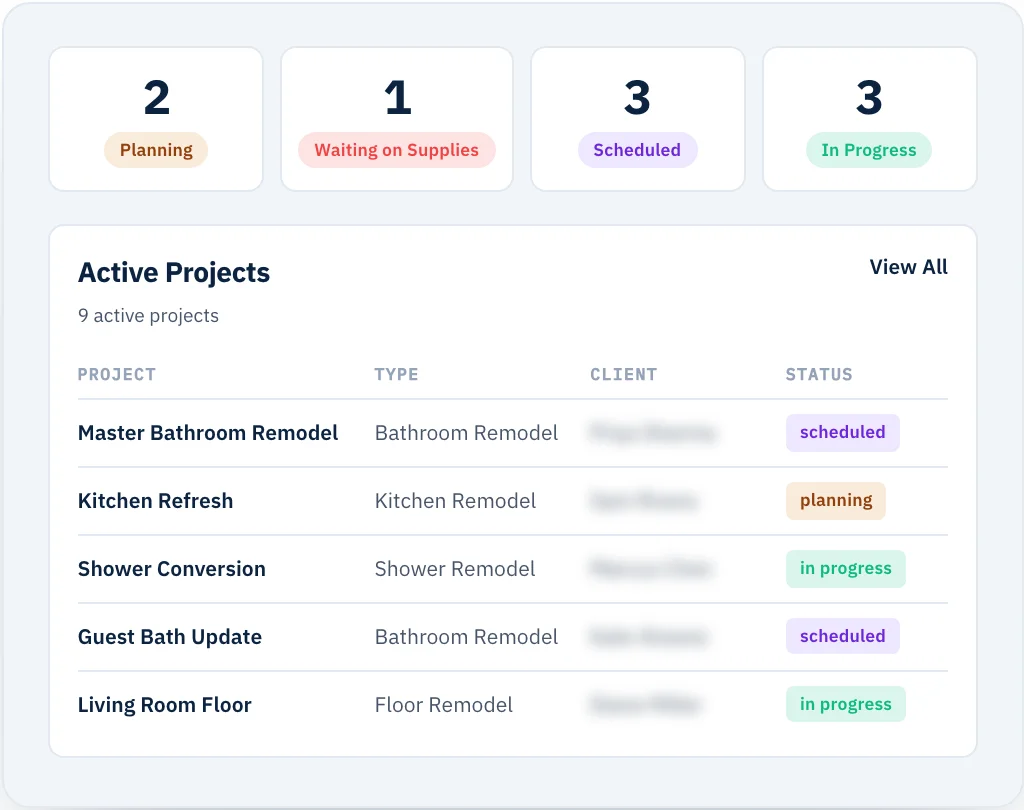
Your entire job site on one single screen.
Manage active schedules, track live job costing, and coordinate trade partners without digging through separate apps.
Manage active schedules, track live job costing, and coordinate trade partners without digging through separate apps.
Contractors don't need a pie chart to know what they're owed.
Before MY LAURA we ran on Jobber, and I kept the real picture in Excel. Every job on its own row — how much had been paid, who we'd paid, what was still owed, whether we were actually profitable once the expenses landed. The software had all of it. It just wouldn't show it to me the way I needed to see it.
When I started building the project section, I made a list of everything I disliked about the systems we'd used. Clicking through four screens to find one number. No easy way back to the project you started on. And charts — graphs and bar charts everywhere, when what a contractor actually wants is plain: what's coming in, what's going out, where this job stands. Nothing fancy. No bells and whistles nobody asked for.
So a project in MY LAURA is one screen. Everything about the job, readable at a glance, nothing you have to hunt for and nothing decorative.
Generate a complete project timeline in 30 seconds flat.
The auto-scheduler scans your approved estimate line items, pairs them with your custom templates, and builds a proposed timeline instantly.
Switch seamlessly between a clean List view, a traditional Month view, or a high-level Gantt chart based on how you like to work.
When you update an appointment, updates route straight to your subcontractors' native calendars — no login required.
We intentionally do not force automatic dependent date shifting. If one trade falls behind, you rearrange crews manually instead of a computer scrambling your entire 6-month calendar.
Stop leaking money on scope creep. Track, bill, and manage changes instantly.
If a client adds three light fixtures, everything you need to bill it, track the sub, and see your locked-in margin lives on the same screen — no arguing over text messages from three months ago.
Go to Change Orders & Sub Tracking →Everything you need to push production forward every single day.
Know your true net margins in real time, line-item by line-item.
See total invoiced, open purchase orders, amounts paid, outstanding balances, and active profit margins on a single dashboard widget.
Track profitability in real time as expenses roll in — protecting your cash before a project slips into the red.
Generate a deep line-by-line Project Profitability Report so your next bid has the historical data behind it.
Every piece above is in every MY LAURA account on day one. Not a Pro tier. Not an add-on. Not metered by project count.
Unlimited projects. Unlimited team. Unlimited trade partners. One price.
Start free trial →Yes. There's no cap on active projects, no cap on team members, and no cap on trade partners. Whether you're running two jobs or fifteen, everything lives on one dashboard and pricing stays the same $299/month.
Yes. Each trade partner gets a calendar feed they can subscribe to once — the schedule flows straight into Apple Calendar, Google, or Outlook. No login. No app to install. When you move a date, their calendar moves.
As you go. The moment you log an expense, approve a PO, or receive an invoice payment, the profitability widget recalculates. You know where the margin is while there's still time to protect it — not at close-out when it's already gone.
It won't. We intentionally left out automatic dependent date-shifting. If a trade runs late, you decide how to rearrange the rest of the schedule — not a computer algorithm that scrambles the whole six-month calendar.
Once the project is on the dashboard, the client, the trade partners, and the crew all need to know what's happening. That's Communication — the client portal, the trade partner portal, and the messaging that keeps everyone on the same schedule.
See how everyone stays on the same page