One portal system. Two audiences. Zero logins.

A branded, no-login page for the homeowner and a private, calendar-fed portal for every trade partner on the job. Same platform, same source of truth, same one flat price — no per-seat fees on either side.

Start free trial

One of our clients helped me test the client-side flow. Some of the trades I was sure would hate a portal are the ones who use it most. I was wrong about who wanted this — turns out everyone did.

For homeowners

Everything the client needs. Nothing they don't.

One branded page. Your logo, your business name, your contact info. Estimates, change orders, invoices, the schedule, and the photos she wanted to see — all behind a magic link she never has to remember a password for.

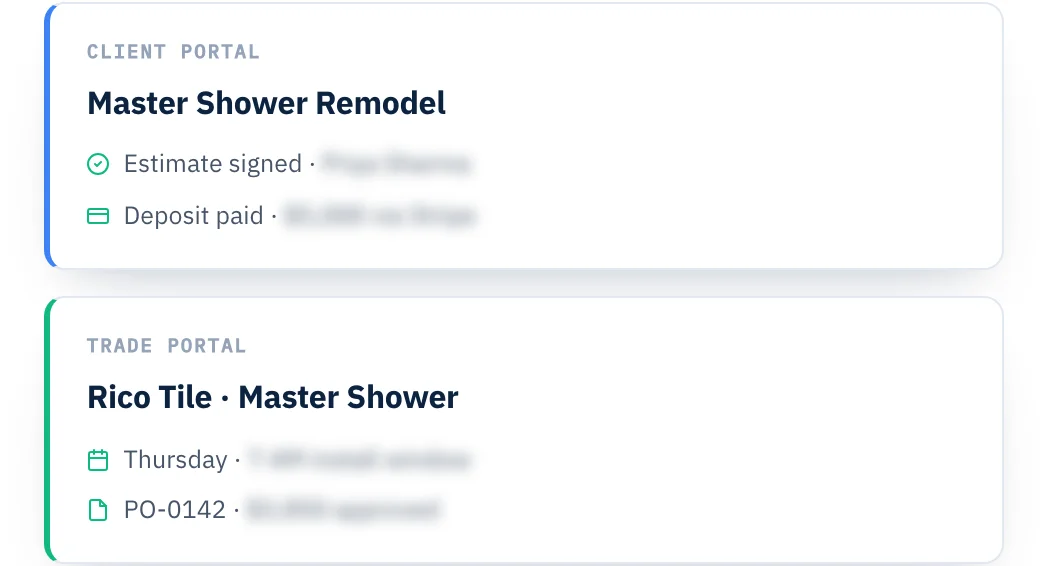
  • Your Branded, No-Login Portal. No account to create. No password to remember. Your logo at the top, your business name, your contact info — it reads as your portal because it is your portal.
  • Signed On Her Phone. The estimate she can read on her couch. The signature that holds up when it matters. The paper trail that starts before the work does.
  • Paid Through Your Own Merchant Account. Invoices carry a Pay button that routes through your own Stripe account — or QuickBooks Payments if you already have it enabled. You pick which one in settings. You keep your processing rate. No platform markup, no held funds, no middleman.
  • The Schedule She Can See. Tile starts Thursday. Cabinets install Monday. Final walkthrough the following Friday. She sees what's next without asking — and can put it in her own calendar.

The client portal only works when the estimate, invoice, schedule, and photos all come from the same place. Bolt a portal onto three separate tools and you spend the weekend explaining why one number doesn't match another. Here she sees one version of the truth — because there's only one version of the truth.
For trade partners

Every trade. Their own portal. Their own calendar feed.

Unlimited seats, included. Every trade sees only what matters to their work — the schedule, the scope, the dates, the PO. When you move a date, their calendar moves. No login they have to remember. No seat you have to pay for.

  • The Schedule In Their Calendar. He subscribes to his calendar feed once — the appointments appear in his existing calendar app. He didn't learn a new tool. He didn't install anything. The schedule is just there.
  • Move A Date, His Calendar Moves. The "he was supposed to be here Tuesday" phone call becomes a thing that doesn't happen. When you change something, his phone updates.
  • His PO Where He Can Find It. His purchase order sits on his page — scope, amount, work status, payment history. No hunting his email for the last version. What he's supposed to do and what he's supposed to get paid, together.
  • Unlimited Trades. No Seat Charges. Ever. Twelve trades on one whole-home remodel? All included. Thirty trades across the year? Same price. Unlike every per-seat platform on the market — subs don't cost you extra.
  • Compliance Docs, Uploaded By The Trade. Trades upload their W-9 and insurance COI directly to their portal — no more chasing paperwork by email. You see every doc from your side with expiration dates surfaced before they lapse, so a subcontractor never rolls onto a job with expired coverage.
  • Their Own Dashboard. Each trade lands on a personal dashboard the moment they open their portal — every project they're on, upcoming appointments, POs waiting on them, and any compliance docs coming up on renewal.

A trade partner portal on a separate tool is a portal that has to be re-fed every time the job changes. Here it's already fed — his schedule is your schedule, his PO is your PO. Nothing to sync. Nothing to keep straight. He sees what's true, the moment it's true.

$299/month

Every account. Day one.

Both portals are in every MY LAURA account on day one. Not a Pro tier. Not an add-on. Not metered by client or trade count.

Unlimited clients. Unlimited trades. Unlimited team. One price.

Start free trial

Frequently asked questions.

Do clients or trade partners need to create an account?

No. Both sides use magic-link access — you send a link, they tap it, they're in. No password. No sign-up form. No "reset my login" phone calls two weeks into the job.

Whose merchant account are online payments processed through?

Yours. Every invoice's Pay button routes through the merchant you choose in settings — Stripe, or QuickBooks Payments if you already have it enabled inside your QuickBooks. Your processing rate, your payout schedule, no platform markup on top.

Are there really no per-seat charges for trade partners?

None. Add one trade or fifty — the price stays $299/month flat. Trade partner seats have been the sneak-cost hidden in every competitor pricing sheet for years, so we don't charge for them at all.

Can I control which files and photos the client sees on their portal?

Yes. Every document, photo, and uploaded file has a share toggle — she sees exactly what you decide to show and nothing else.

The portals are one piece of how everyone stays in sync.

Client and trade portals live inside the Communication side of MY LAURA — with two-way SMS, live activity tracking, and automated review requests all wired to the same source of truth.

See the whole Communication side